No signal in the loft. Carry on.
A loft, a cellar, a plant room, a new-build with no mast for miles. The Sendinvo app keeps your schedule, jobs, clients, quotes, and invoices on the phone, so you can read them and keep working with no signal. What you do is sent when you’re back online.

30 days of everything, free. No card needed.

Scan to get the app
Lose signal, keep working
Everything’s already there
Your schedule, jobs, clients, quotes, and invoices are kept on the phone as they last were, so they open with no signal.
Carry on
Book a visit, start and finish one, write a quote, add a client, or write down an extra. Each change is saved on the phone at once.
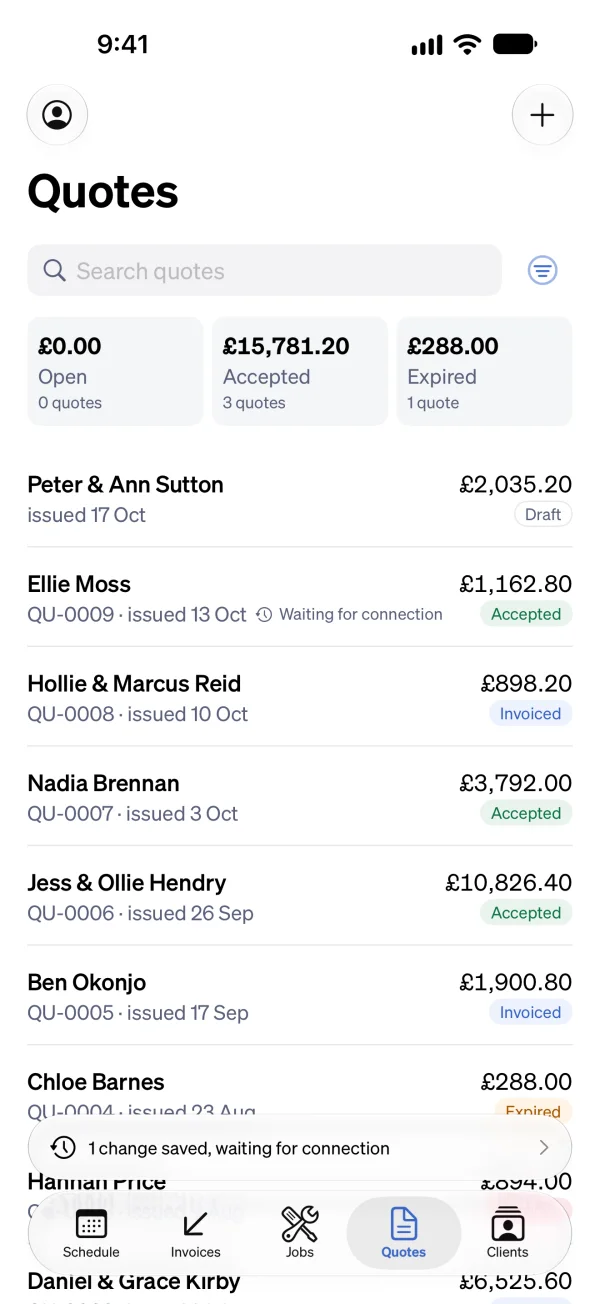
See what’s waiting
A line on the screen counts what hasn’t gone yet, such as “1 change saved, waiting for connection”, and each thing that’s waiting says so.
Back in signal
Everything is sent by itself, in the order you did it, and the office sees it on the web.
The work carries on. Emails and money wait.
With no signal you can do the work of the day in the Sendinvo app:
- Book a visit, move it, start it, and finish it, or change its times afterwards.
- Start a job, change it, or archive it.
- Write or change a draft quote or a draft invoice.
- Add a client or change their details.
- Write down an extra on a job, such as a part you fitted that wasn’t on the quote.
- Take photos, record voice notes, and add files. They’re kept on the phone and uploaded when you’re back online.
- Stop something going out: pause an invoice’s reminders, call off a scheduled send, or pause a recurring invoice.
What needs a connection
Sending a quote or an invoice, and recording a payment or a refund. Each one emails a client or moves money, so the app says it needs a connection and doesn’t keep it for later. Save the draft with no signal and send it when you’re back.
A visit booked with no signal still tells the client
The booking email goes when your phone reconnects, unless the visit’s day has already gone by then.
When two people change the same thing
If the office changed a job while you were out of signal, Sendinvo doesn’t pick a winner. The app says it was changed somewhere else, and asks which version to keep.
In the app
The Sendinvo app is available on the App Store for iPhone and iPad, and there’s no Android app yet. Working with no signal is the app’s. The web needs a connection.
Good to know
Do I need signal to use the Sendinvo app?
No. The app keeps your schedule, jobs, clients, quotes, and invoices on the phone. You can read them and keep working with no signal, and what you do is sent when you’re back online.
What happens to photos and voice notes taken with no signal?
They’re kept on the phone and shown on the job as waiting. They upload by themselves when you’re back online.
Can I send an invoice with no signal?
No. Sending a quote or an invoice needs a connection, and so does recording a payment. You can write the invoice and save it as a draft with no signal, then send it when you’re back online.
What if someone else changed the same job while I had no signal?
The app tells you it was changed somewhere else and asks which version to keep. Nothing is overwritten without you choosing.
Does the web work with no signal?
No. The web needs a connection. Working with no signal is in the Sendinvo app.
Keep working where the signal doesn’t reach.
30 days of everything, free. No card needed.